
Phase 7 of the custom hosting control panel build started with a clear and focused goal: implement SSL groundwork, validate domain readiness, and prepare the system for certificate issuance.
This phase builds directly on Phase 6, where the panel gained the ability to provision the live web stack safely.
What followed was a turning point in the project.
As development progressed, it became clear that SSL was not just a backend concern — it directly affected how users understand and interact with their sites.
Without the right interface, even a well-built system becomes difficult to use.
That realisation led to a major shift.
Phase 7 evolved into two key outcomes:
- A complete SSL and domain readiness foundation
- A full redesign of the client experience
Both were necessary — and more importantly, both now work together.
🧭 Why Phase 7 Expanded in the Custom Hosting Control Panel Build
The original plan for this phase was simple:
- Validate DNS
- Check domain readiness
- Enable SSL issuance
Very sensible. Very focused. Very optimistic.
But during implementation, a problem became obvious.
There was no clear way for a user to understand:
- Why SSL was not available
- What needed to be fixed
- Whether their site was actually ready
Adding SSL functionality on top of an unclear interface would not have created value.
It would have created confusion with a padlock icon on it.
Instead of forcing it through, the decision was made to step back and redesign the client experience properly.
This was not a delay.
It was a necessary correction.
🖥️ First Look: The Client Panel
Up until this point in the build, everything had been backend-focused.
Provisioning, system services, queue workers, infrastructure — all critical pieces, but nothing truly visible to the end user.
Phase 7 changes that.
For the first time, the control panel starts to feel like an actual product rather than a very organised pile of good intentions and backend logic.
With the client experience redesign, the system now has a structured, feature-driven interface that allows users to manage their sites in a way that is both clear and familiar.
Below is the first look at the KR0311 client panel in its current state:
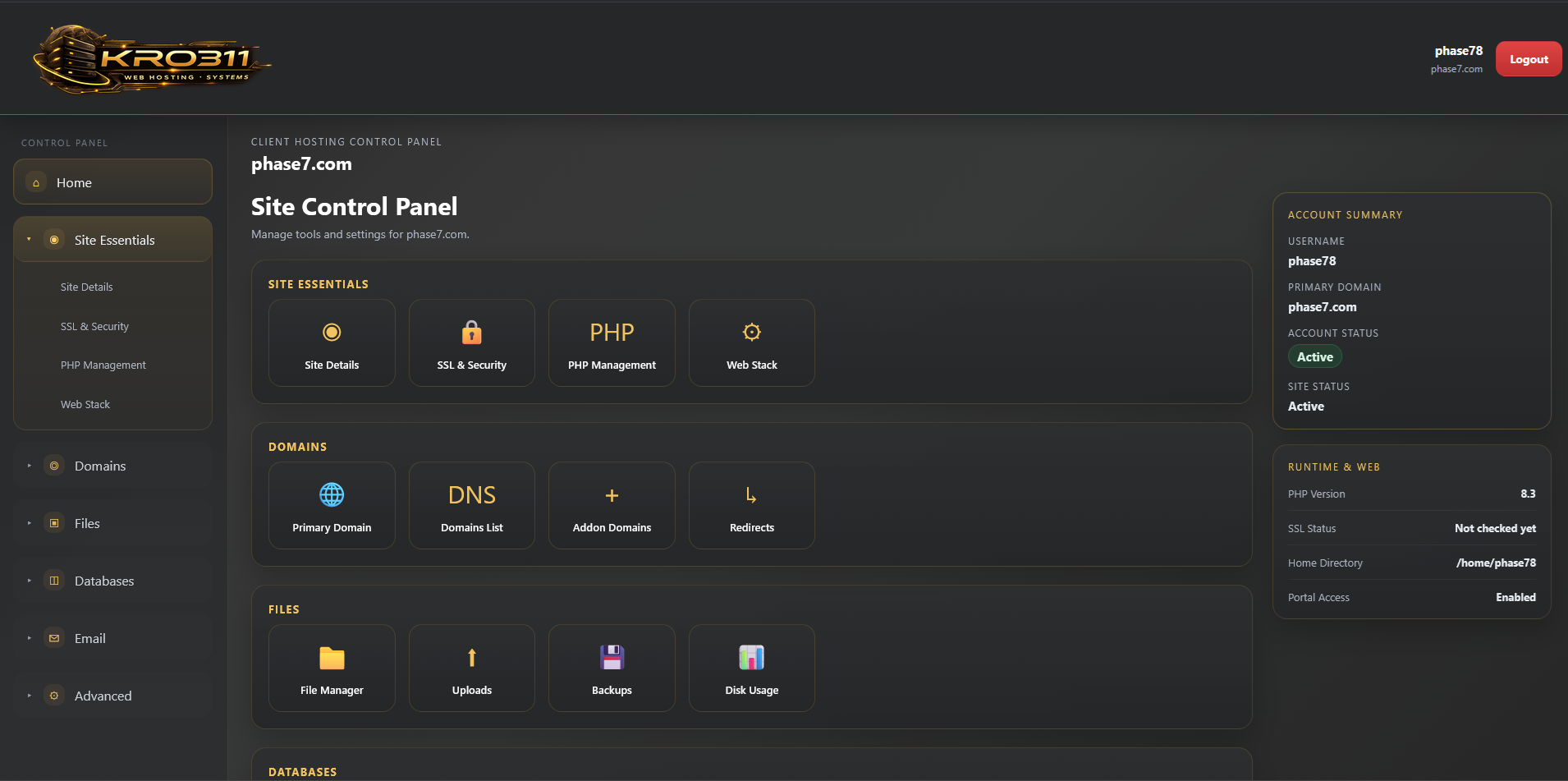
This view represents a significant shift from earlier phases:
- Clear navigation with grouped functionality
- Dedicated site management sections
- Real-time visibility of system state
- Actionable controls instead of passive data
It is no longer just infrastructure.
It is an interface people can actually use without needing a guided tour and a quiet cry.
🔐 SSL Groundwork
At its core, Phase 7 introduces a structured SSL readiness system.
Instead of immediately attempting certificate issuance, the system now evaluates whether a site is actually ready to receive SSL.
This includes:
- Certificate presence detection
- HTTP availability checks
- DNS validation status
- Environment constraints
The guiding principle is simple:
Only attempt SSL when the system is ready.
This avoids failed issuance attempts, reduces confusion, and keeps system state consistent.
Which is much better than repeatedly asking Let’s Encrypt for miracles and then acting shocked when it says no.
The overall workflow is being shaped around the same principles described in the Let’s Encrypt overview, where certificate issuance depends on domain control and environment readiness rather than wishful thinking.
🌍 DNS & Domain Readiness
To support SSL readiness, a DNS validation layer was introduced.
This is handled through a dedicated service:
- DnsValidationService
This service is responsible for:
- Checking domain resolution
- Preparing for DNS record validation
- Returning structured validation results
Even in its current placeholder form, it establishes a critical rule:
DNS is verified — not assumed.
Which sounds obvious, right up until a system assumes it is fine and then spends the rest of the day proving otherwise.
The intended direction also aligns with the kind of DNS and HTTP validation required for ACME-based issuance, as outlined in the Let’s Encrypt challenge documentation.
🏠 Internal-Only Constraints & Design Decisions
This phase is being developed in an internal-only environment.
That has a direct impact on SSL functionality.
Public ACME validation, such as Let’s Encrypt, requires:
- Public DNS resolution
- External HTTP accessibility
Neither are available in this setup.
Rather than attempting awkward workarounds or pretending the limitation did not exist, the system explicitly accounts for it.
This led to a deliberate design approach:
- Block certificate issuance in internal environments
- Clearly communicate why in the UI
- Expose readiness status instead of forcing actions
This keeps behaviour predictable in development while making the path to production clear.
In other words: the panel now knows the difference between “not ready yet” and “flat-out impossible in this environment,” which is a very useful distinction.
🧪 Readiness System & Manual Control
Phase 7 introduces a manual SSL readiness check.
Users can trigger a “Check SSL Readiness” action, which evaluates:
- DNS status
- Web server readiness
- Environment eligibility
The results are stored and displayed directly in the interface.
This approach provides:
- Transparency into system state
- Clear feedback for troubleshooting
Automation will come later — but only after the behaviour is proven and the feedback loop is clear.
Which is a much nicer strategy than automating confusion at scale.
🗄️ Database Structure for SSL & DNS Tracking
To support this system, new fields were added to the sites table:
- ssl_last_checked_at
- ssl_last_check_status
- ssl_last_check_message
- ssl_dns_last_checked_at
- ssl_dns_status
- ssl_dns_message
This allows the system to persist validation results and present meaningful feedback to the user.
Everything is tracked. Nothing is assumed.
Which is becoming a bit of a theme in this project — for very good reason.
🎨 Client Panel Redesign
This is where Phase 7 expanded significantly.
The original client interface was functional, but it lacked clarity, structure, and room to grow.
It could display information, but it was not doing enough to explain the system or guide the user through it.
Rather than iterating on a weak foundation, the decision was made to rebuild it properly.
The new client panel introduces:
- Clear, grouped navigation
- Dedicated feature sections
- Improved visibility of system state
- A more intuitive management flow
This brings the panel closer to the kind of structure users expect from real hosting platforms, while still keeping full control over the design and behaviour.
🧩 Moving Toward a cPanel-Style Experience
The redesigned interface follows a familiar model:
- Feature-based navigation
- Logical grouping of tools
- Clear separation between sections
Key areas now include:
- Site Details
- SSL & Security
- PHP Management
- Web Stack
This structure reduces friction and makes the system easier to understand without needing constant explanation.
That matters, because users should be managing their site — not deciphering the panel like it is a puzzle game.
🛠️ Improvements to Site Management
The “Manage Site” experience has been completely reworked.
It now provides:
- Quick action shortcuts
- Clear status indicators
- Structured data presentation
- Context-aware messaging
Users can now immediately understand:
- What is working
- What is not
- Why
This shifts the interface from reactive to informative.
Which is exactly what a hosting panel should be doing instead of just standing there looking technical.
🏗️ Architecture Decisions & Separation
The system continues to follow a clean architecture approach.
Controllers remain thin, with logic handled by dedicated services:
- SslStatusService
- DnsValidationService
- SiteStatusService
This ensures:
- Reusable logic
- Clear separation of concerns
- Future scalability
The UI is no longer tightly coupled to system behaviour, which allows both to evolve independently.
Which is very helpful when one side needs a redesign and the other side is busy deciding whether DNS is behaving itself.
🔄 What Changed From the Original Plan
Phase 7 was originally intended to focus purely on SSL.
It expanded into a broader phase because SSL depends heavily on user understanding and interaction.
The existing UI could not support that effectively.
Rather than layering complexity on top of a weak interface, the foundation was rebuilt.
This decision significantly improved the overall system.
It also made Phase 7 much bigger than planned, which seems to be what happens every time a project starts “just adding one thing.”
✅ Final Outcome of Phase 7
By the end of this phase, the control panel now has:
- A complete SSL readiness system
- DNS validation groundwork
- Structured tracking of SSL and domain state
- Environment-aware behaviour
- A fully redesigned client interface
- Clear separation between admin and client functionality
This phase established a much stronger foundation for future work.
Not just technically, but from a product and usability point of view as well.
🔜 What Comes Next
With the groundwork in place, the next phase will focus on:
- Real DNS validation logic
- Public ACME integration
- Certificate issuance workflows
- Automation using queued jobs
Phase 7 did not just introduce SSL groundwork.
It made the system ready for SSL properly.
And for the first time, it made the client side of the panel feel like it belongs in the same sentence as the backend powering it.