

I didn’t plan for this to turn into a full system stress test.
What started as a simple job – organising an iCloud photo dump – quickly escalated into one of the most revealing (and slightly chaotic) moments I’ve had with my homelab.
This post sits later in my homelab journey, once everything was already built and running smoothly. And honestly… it ended up being the perfect accidental test of the entire stack.
🧱 The Setup
At this point in my setup:
– Proxmox host (R730) running multiple VMs
– TrueNAS handling storage (ZFS)
– A Lubuntu VM used as a utility machine
All running locally on the same host — no external bottlenecks, no excuses.
🎯 The Task
The task was simple (or so I thought):
Take ~12,000 photos and videos dumped into a single folder and organise them into a clean structure:
Sorted by: YYYY/MM
Nice and tidy. Easy job… right?
⚠️ The First Mistake
I opened Rapid Photo Downloader and immediately selected the source folder…
Bad idea.
It instantly started scanning all 12,000 files, generating thumbnails, and confidently creating folder structures I never asked for.
Before I’d even touched the settings.
At this point, I wasn’t organising files anymore — I was watching chaos unfold in real time.
This resulted in a mess of incorrectly named folders that I then had to clean up manually.
🔧 Reset & Proper Approach
After admitting defeat (and undoing the damage via CLI), I tried again — properly this time.
- Set destination first
- Configure folder structure (Year/Month)
- Disable thumbnails generation
- THEN select source
Amazing what happens when you do things in the right order.
This made a huge difference in both performance and stability.
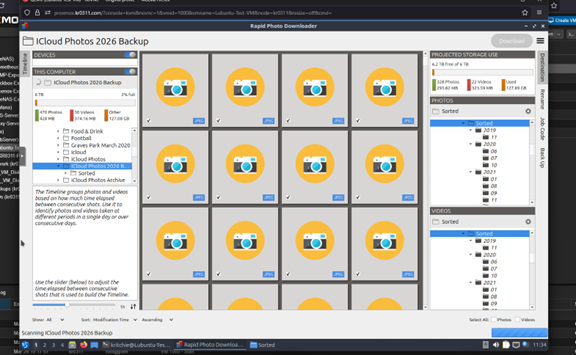
After fixing the setup, the structure looked like this:
🚀 When It Started Working… Properly
As soon as the job started correctly, things got interesting.
Both the processing VM and storage VM started ramping up almost immediately.
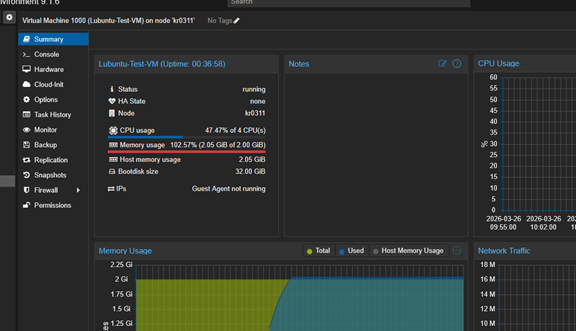
The Lubuntu VM handling the sorting began chewing through memory and CPU, while TrueNAS kicked into gear, aggressively caching and handling I/O like it had something to prove.
Lubuntu VM under load on the first attempt (before I gave it 12GB RAM):
⚙️ What Was Actually Happening
This workload turned out to be far more demanding than expected:
– Thousands of small file operations
– Metadata (EXIF) parsing per file
– Constant read/write operations
– Directory creation and file moves
Individually, each operation is tiny.
At this scale? Not so much.
This is pretty much a worst-case scenario for storage systems — lots of small, repetitive operations that don’t scale nicely.
💾 TrueNAS Behaviour
At the same time, TrueNAS started ramping up.
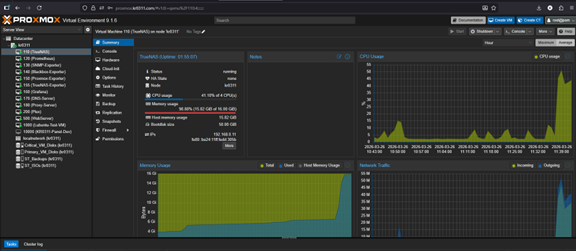
RAM usage shot up close to 100%, which might look alarming at first — but this is exactly what you want.
ZFS uses available memory for ARC cache, improving performance during heavy workloads.
Disk I/O spiked as files were being read, moved, and rewritten across the dataset.
TrueNAS under heavy load:
🧠 Meanwhile… The Host
And then there’s the part that made me laugh.
Despite all of this activity…
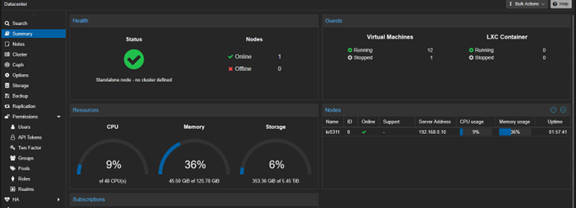
The Proxmox host itself barely broke a sweat.
CPU usage hovered around ~9%, and overall system resources were largely untouched.
It was basically sat there like:
“Is that it?”
This highlighted an important point:
The workload wasn’t limited by compute power — it was limited by I/O and per-file operations.
Meanwhile, the host:
🧩 Conclusion
What started as a simple photo organisation task turned into a full-stack test of my homelab.
It validated:
– VM resource allocation
– Storage performance under load
– ZFS caching behaviour
– Overall system headroom
And more importantly…
It proved the setup could handle real-world workloads without falling over — even if the VMs themselves looked like they were fighting for their lives at times.
Also, a valuable lesson was learned:
👉 Configure first
👉 Select 12,000 files second